




asp.net core调用wps实现word转pdf的过程
时间:2024-08-16 09:51:56|栏目:ASP.NET|点击: 次

安装wps
https://www.wps.cn/


创建.net core控制项目
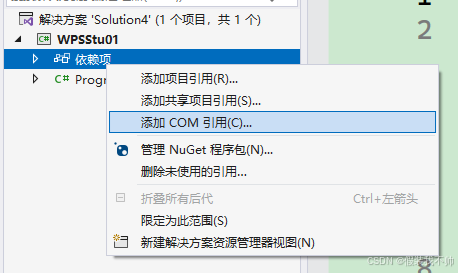
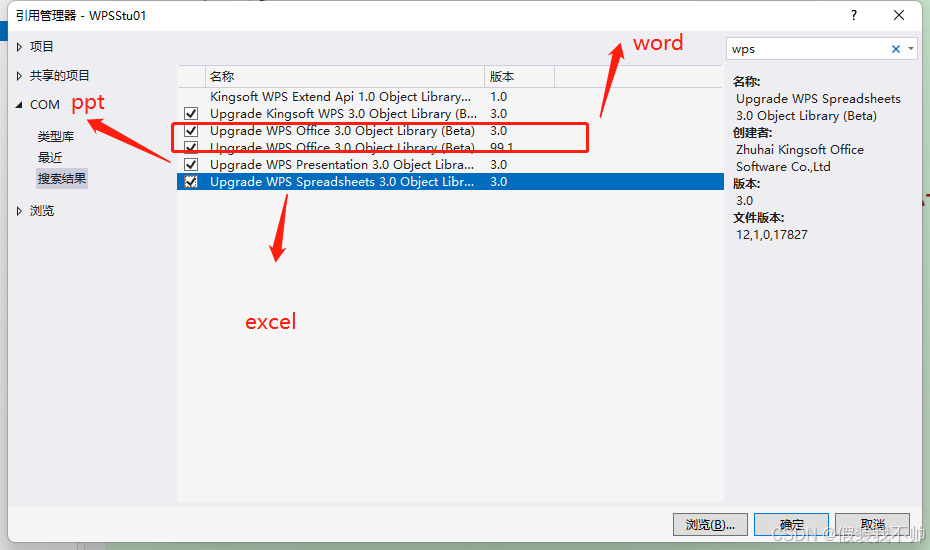
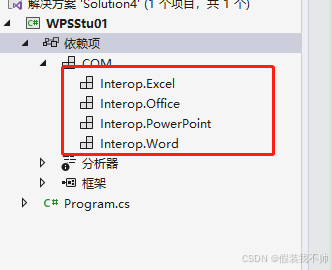
添加com引用,搜索wps
准备word,名字叫001.docx

word转pdf
编写代码
namespace WPSStu01
{
internal class Program
{
static void Main(string[] args)
{
Console.WriteLine("转化开始");
var inputFile = "001.docx";
var outputFile = "001.pdf";
WordExportAsPdf(inputFile, outputFile);
Console.WriteLine("转化成功");
Console.ReadKey();
}
///
/// 转换为pdf文件,适合(.doc、.docx、.mht、.htm文件类型)
///
///
///
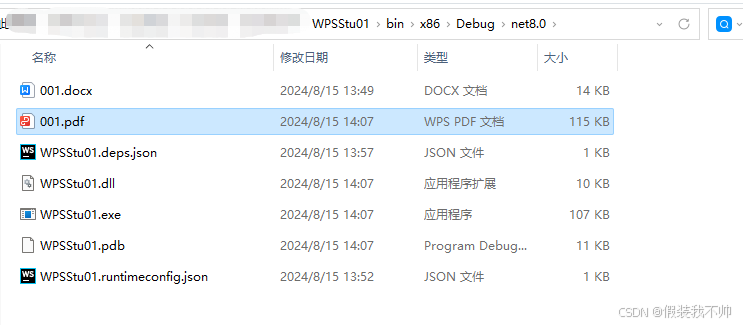
/// 启动项目报错

选择一下32位程序

发现还是不行,最后换成.net framework 4.8的控制台项目
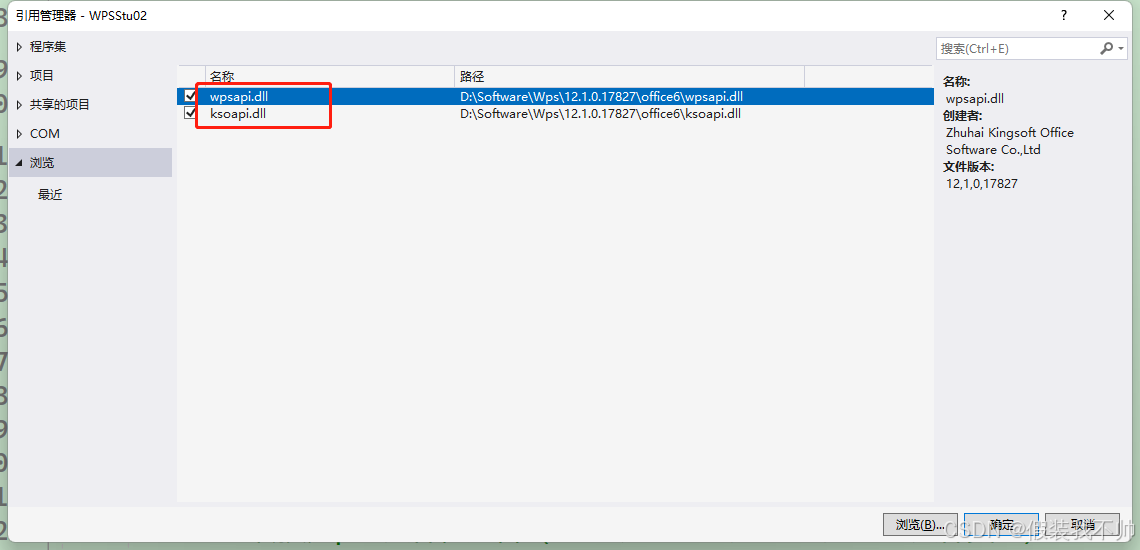
添加dll的引用,dll需要去安装的wps里面查找
Console.WriteLine("转化开始");
var exePath = System.AppDomain.CurrentDomain.BaseDirectory;
var inputFile = Path.Combine(exePath, "001.docx");
var outputFile = Path.Combine(exePath, "001.pdf");
WordExportAsPdf(inputFile, outputFile);
Console.WriteLine("转化成功");
Console.ReadKey();
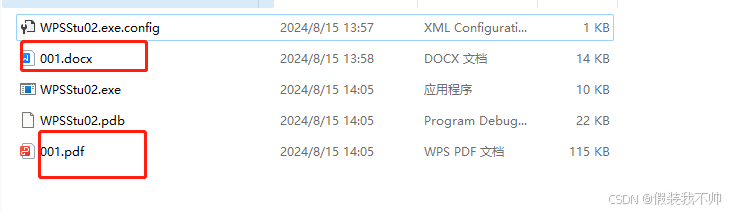

asp.net core也可以问题根本原因是路径的问题,不能些相对路径,必须绝对路径
excel转pdf
////// Excel转换为pdf文件 /// /// /// ///public static string ExcelExportAsPdf(string fileName, string outputFileName) { string isSucceed = "OK"; Excel.Application excelApp = null; if (excelApp == null) excelApp = new Excel.Application(); Excel.Workbook workBook = null; try { workBook = excelApp.Workbooks.Open(fileName, false, true); workBook.ExportAsFixedFormat(Excel.XlFixedFormatType.xlTypePDF,outputFileName); } catch (Exception ex) { isSucceed = ex.Message; } finally { if (workBook != null) { workBook.Close(false); workBook = null; } if (excelApp != null) { excelApp.Quit(); excelApp = null; } } return isSucceed; }
调用
Console.WriteLine("转化开始");
var exePath = System.AppDomain.CurrentDomain.BaseDirectory;
var inputFile = Path.Combine(exePath, "002.xls");
var outputFile = Path.Combine(exePath, "002.pdf");
ExcelExportAsPdf(inputFile, outputFile);
Console.WriteLine("转化成功");
Console.ReadKey();
ppt转pdf
////// PPT转换为pdf文件 /// /// /// ///public static string PptExportAsPdf(string fileName, string outputFileName) { string isSucceed = "OK"; PowerPoint.Application pptApp = null; if (pptApp == null) pptApp = new PowerPoint.Application(); PowerPoint.Presentation presentation = null; try { presentation = pptApp.Presentations.Open(fileName); presentation.ExportAsFixedFormat(outputFileName,PowerPoint.PpFixedFormatType.ppFixedFormatTypePDF); } catch (Exception ex) { isSucceed = ex.Message; } finally { if (pptApp != null) { presentation.Close(); pptApp = null; } if (pptApp != null) { pptApp.Quit(); pptApp = null; } } return isSucceed; }
调用
Console.WriteLine("转化开始");
var exePath = System.AppDomain.CurrentDomain.BaseDirectory;
var inputFile = Path.Combine(exePath, "003.pptx");
var outputFile = Path.Combine(exePath, "003.pdf");
PptExportAsPdf(inputFile, outputFile);
Console.WriteLine("转化成功");
Console.ReadKey();
到此这篇关于asp.net core 调用wps实现word转pdf的文章就介绍到这了,更多相关asp.net core word转pdf内容请搜索科站长以前的文章或继续浏览下面的相关文章希望大家以后多多支持科站长!
上一篇:.NET 8 中如何利用 MediatR 实现高效消息传递
栏 目:ASP.NET
本文标题:asp.net core调用wps实现word转pdf的过程
本文地址:https://zz.feitang.co/wangluobiancheng/3263.html
您可能感兴趣的文章


阅读排行
推荐教程
- 07-25在 .NET 中 使用 ANTLR4构建语法分析器的方法
- 07-25ASP.NET中Onclick与OnClientClick遇到的问题
- 07-25ASP.NET Core 模型验证消息的本地化新姿势详解
- 07-25Asp.NET Core WebApi 配置文件详细说明
- 07-25.NET Core 实现缓存的预热的方式
- 03-31详解如何在.NET代码中使用本地部署的Deepseek语言模型
- 07-25.NET根据文件的哈希值筛选重复文件的实现思路
- 07-25Math.NET Numerics 开源数学库安装使用详解
- 07-25.NET 中的深拷贝实现方法详解
- 07-25.NET WPF 可视化树(Visual Tree)详解