




MySQL 5.7 vs 8.0,性能PK

背景
测试MySQL5.7和mysql8.0 分别在读写、只读、只写模式下不同并发时的性能(tps,qps)
前提
- 测试使用版本为mysql5.7.22和mysql8.0.15
- sysbench测试前先重启mysql服务,并清空os的cache(避免多次测试时命中缓存)
- 每次进行测试都是新生成测试数据后再进行mysql5.7和mysql8.0的测试
- 每次测试时保证mysql5.7和mysql8.0的配置参数一致
环境
机器
cat /etc/redhat-release | xargs echo '版本 ' && dmidecode -s system-product-name | xargs echo '是否虚拟化 ' && cat /proc/cpuinfo |grep "processor"|wc -l | xargs echo 'cpu核数 '
版本 CentOS Linux release 7.5.1804 (Core)
是否虚拟化 KVM
cpu核数 4
myql5.7.22
5.7.22-log
innodb_buffer_pool_size 128M
innodb_log_buffer_size  64M
innodb_log_file_size    48M
binlog_format   ROW
log_bin ON
transaction_isolation   REPEATABLE-READ复制代码
mysql8.0.15
8.0.15
innodb_buffer_pool_size 128M
innodb_log_buffer_size  64M
innodb_log_file_size    48M
binlog_format   ROW
log_bin ON
transaction_isolation   REPEATABLE-READ
sysbench
sysbench -V
sysbench 1.1.0 (using bundled LuaJIT 2.1.0-beta3)
测试
-
在不同的持久化策略下(binlog, redo log持久化)mysql5.7和mysql8.0 在读写模式、只读模式、只写模式(oltp_read_write,oltp_read_only,oltp_write_only)下的性能表现
-
sysbench 测试时间为60s,测试的表数量为20
-
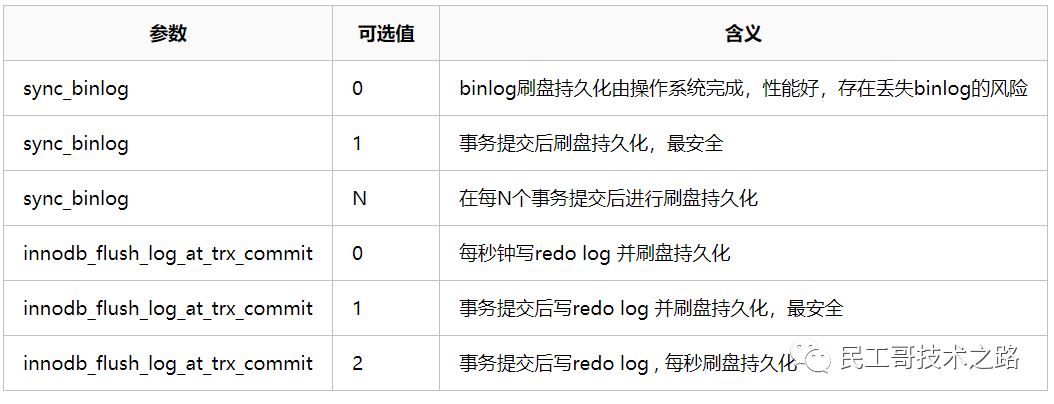
测试分别在双1模式(安全性)和0 2模式(高性能)下进行
-
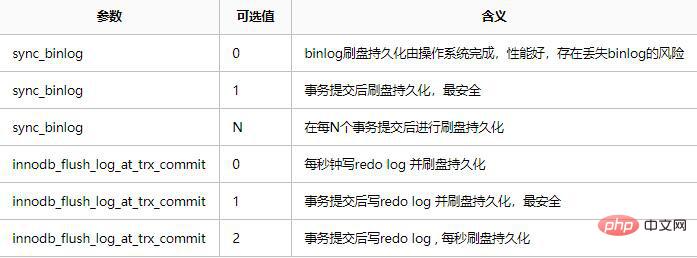
SHOW GLOBAL VARIABLES WHERE Variable_name IN('sync_binlog','innodb_flush_log_at_trx_commit'); +--------------------------------+-------+ | Variable_name | Value | +--------------------------------+-------+ | innodb_flush_log_at_trx_commit | 1 | | sync_binlog | 1 | +--------------------------------+-------+
mysql5.7和mysql8.0 在读写模式下的表现
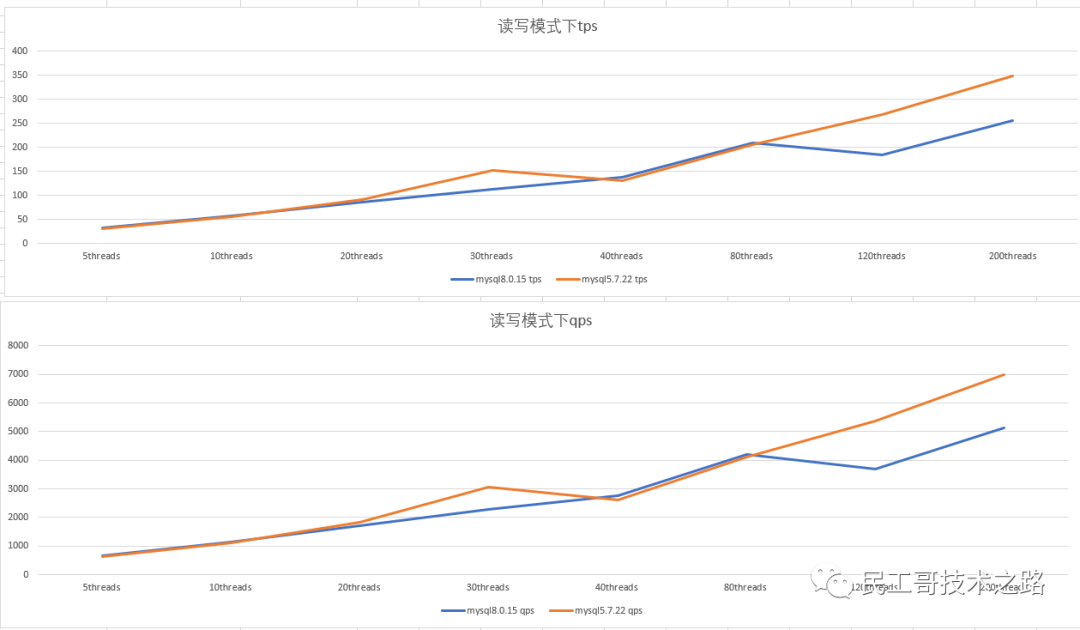
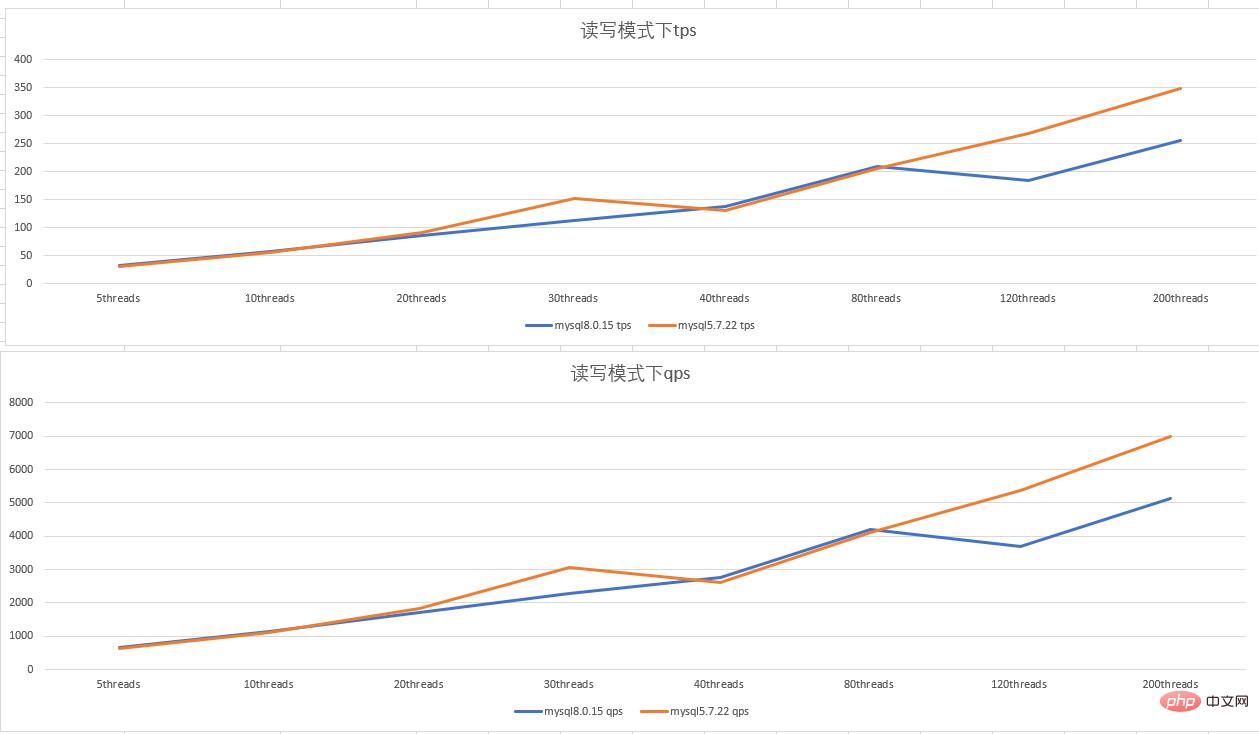
- 双1 配置,读写模式下,mysql5.7.22 和mysql8.0.15 tps 、qps 性能差不多,mysql8.0.15 在120 线程并发时,性能出现了下降抖动:
mysql5.7和mysql8.0 在只读模式下的表现
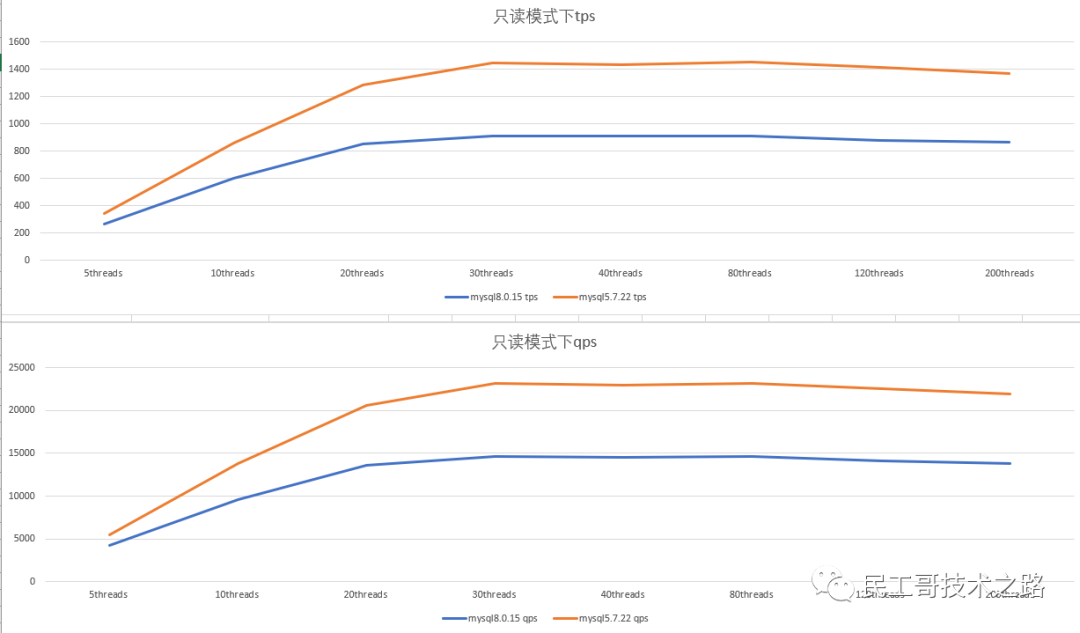
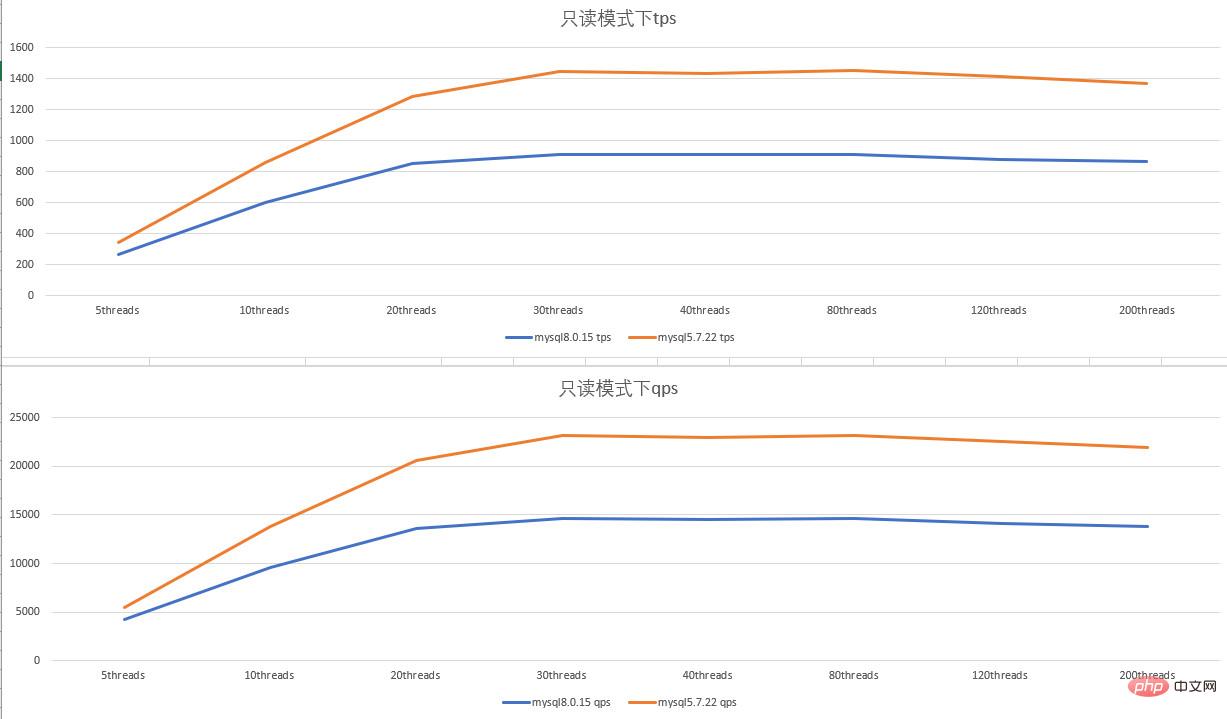
- 双1 配置,只读模式下,mysql5.7.22 的tps、qps比mysql8.0.15 好1/3 左右;并发线程数增加后,tps、qps并没有随着增加,反而出现了下降的趋势。
mysql5.7和mysql8.0 在只写模式下的表现
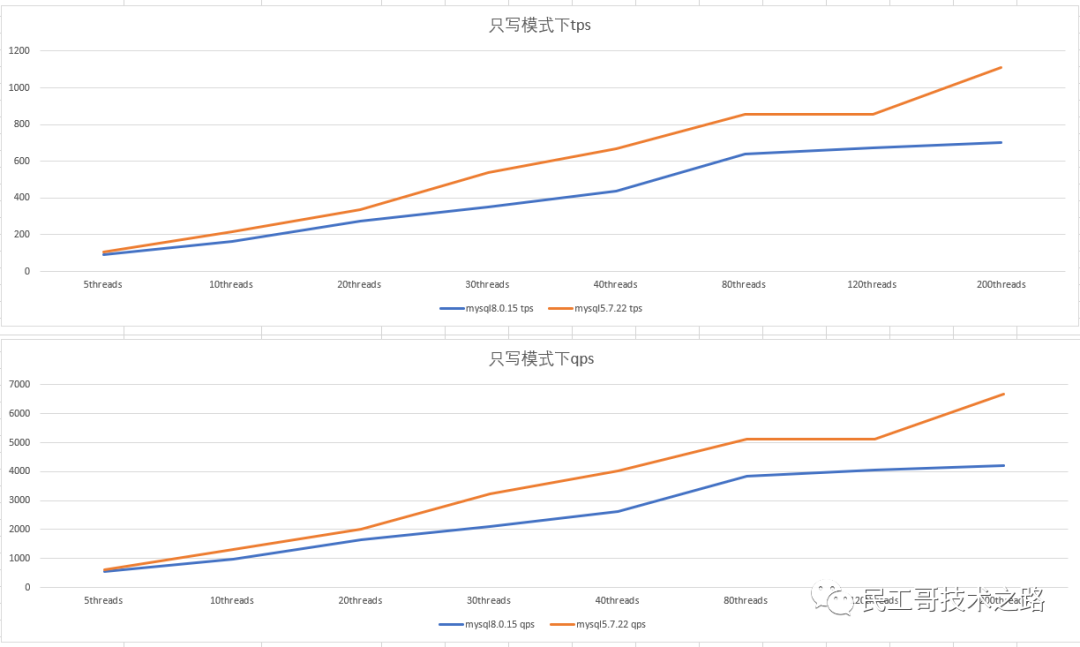
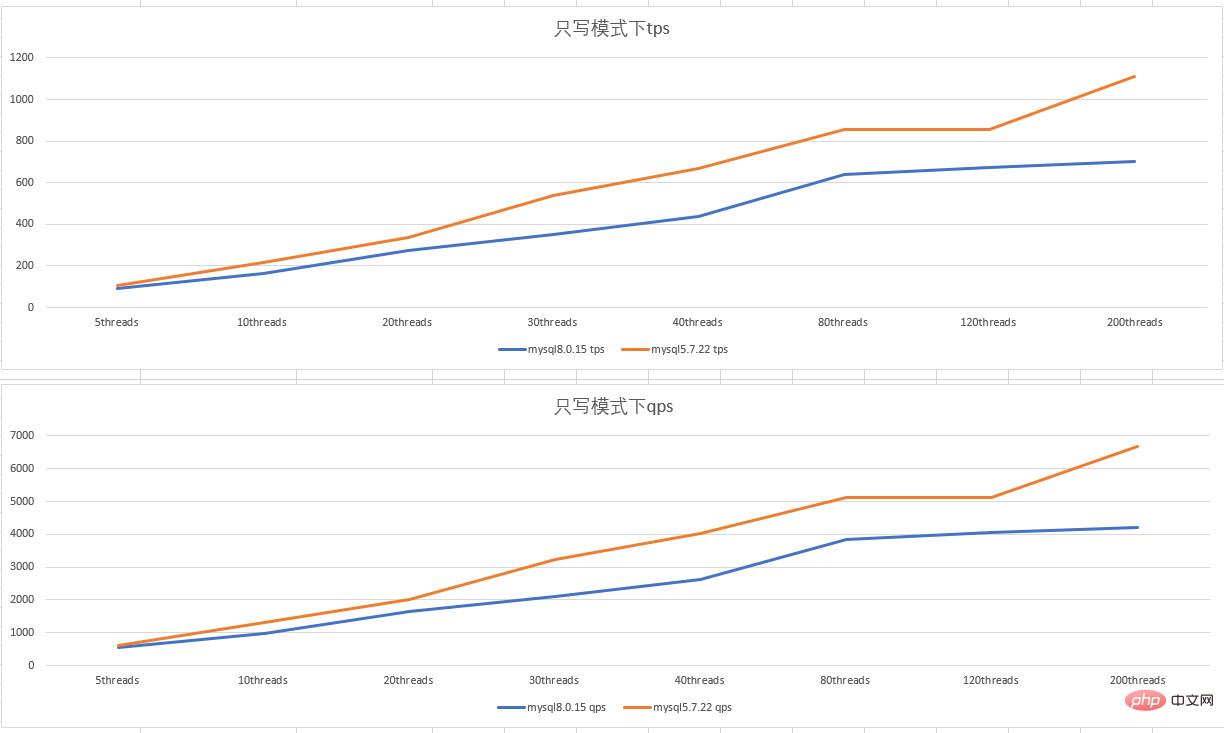
- 双1 配置,只写模式下,随着并发数的上升,mysql5.7.22 的性能比mysql8.0.15 好1/4左右。
0 2 模式下
SHOW GLOBAL  VARIABLES WHERE Variable_name IN('sync_binlog','innodb_flush_log_at_trx_commit');
+--------------------------------+-------+
| Variable_name                  | Value |
+--------------------------------+-------+
| innodb_flush_log_at_trx_commit | 2     |
| sync_binlog                    | 0   |
+--------------------------------+-------+复制代码
mysql5.7和mysql8.0 在读写模式下的表现
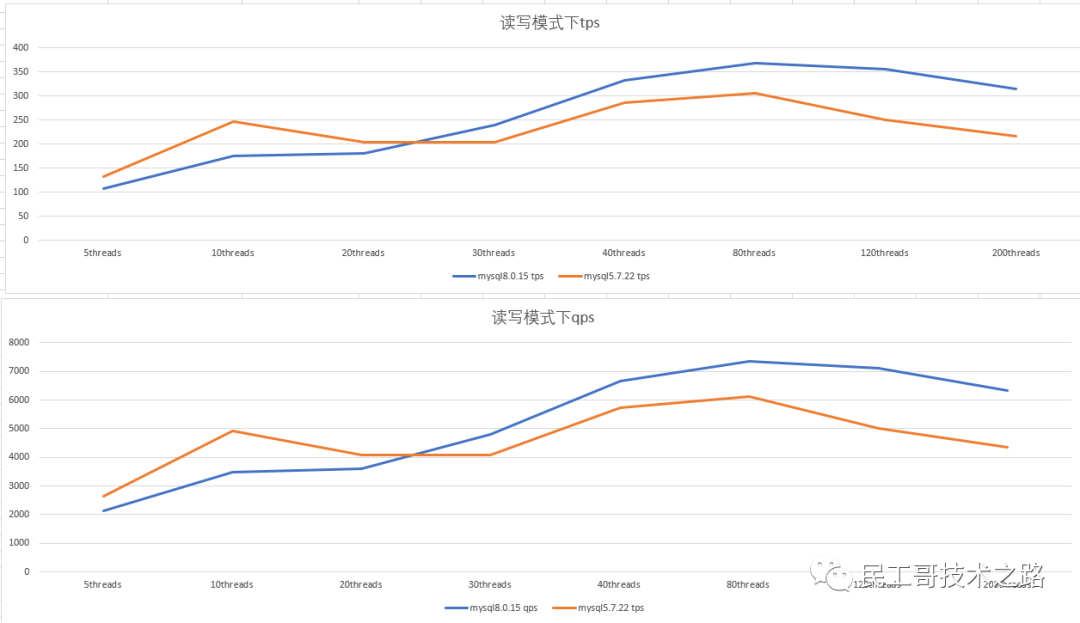
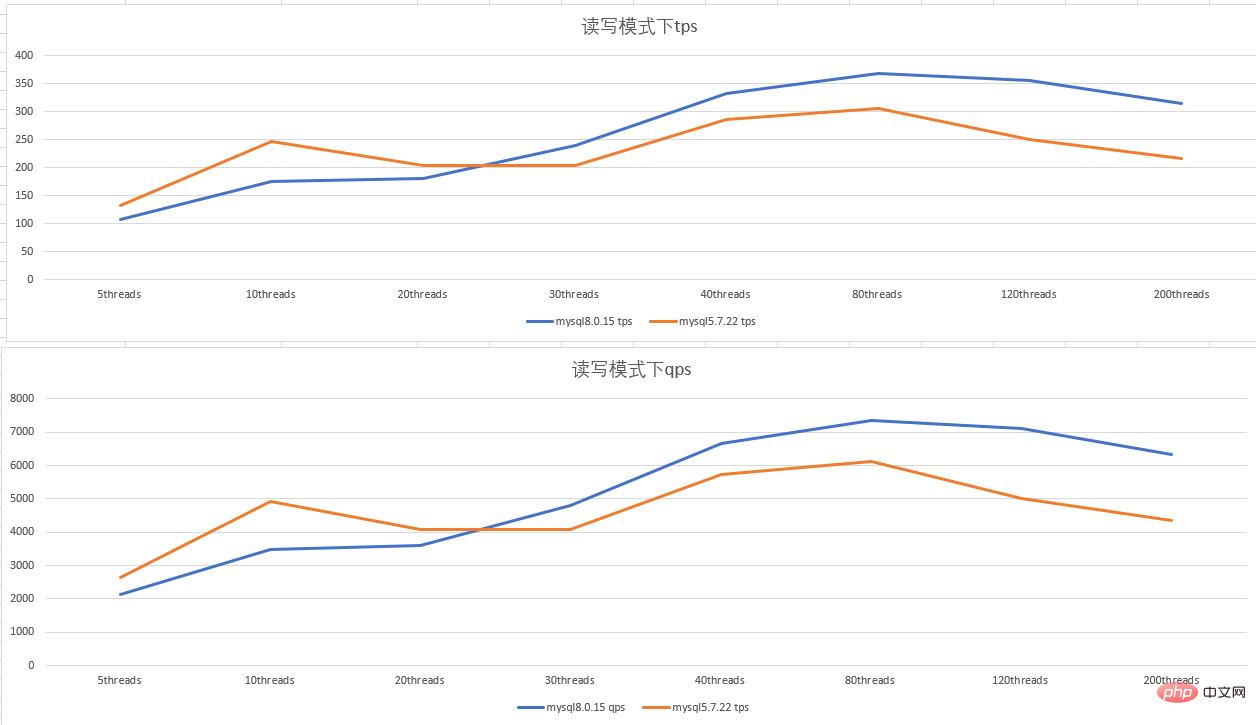
- 0 2配置,读写模式下,并发数低时,mysql5.7.22性能好于mysql8.0.15; 并发数比较高时,mysql8.0.15 性能好于mysql5.7.22;在80 线程的并发以上时,性能开始下降。
mysql5.7和mysql8.0 在只读模式下的表现
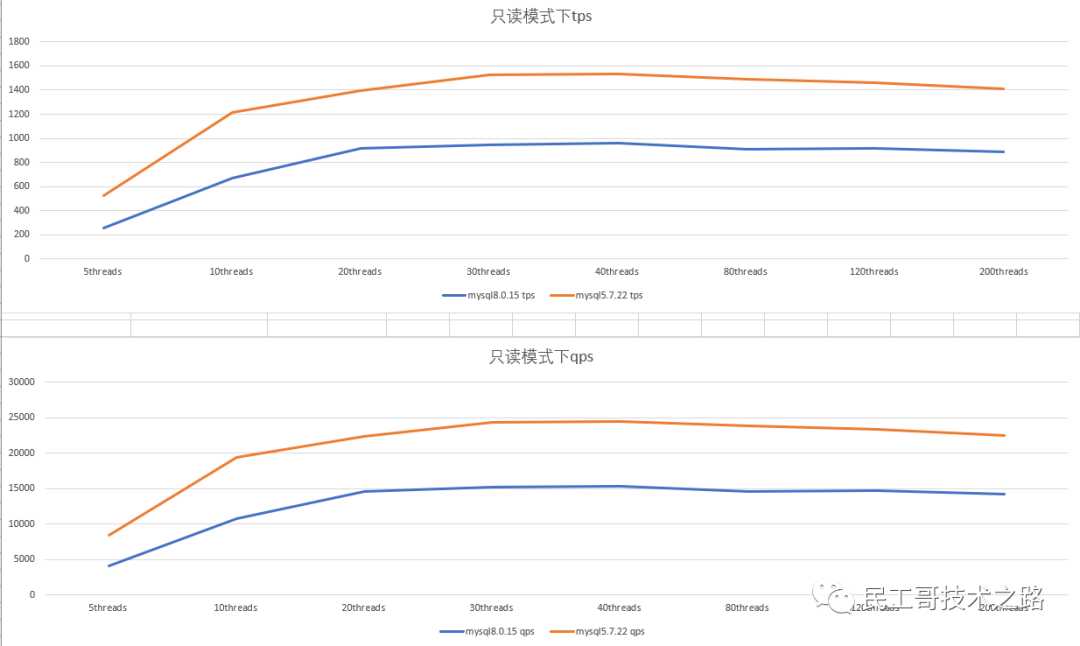
- 0%202配置,只读模式下,mysql5.7.22性能比mysql8.0.15%20好1/3左右;随着并发数的上升,性能也没有上升,反而有下降的趋势.
mysql5.7和mysql8.0%20在只写模式下的表现
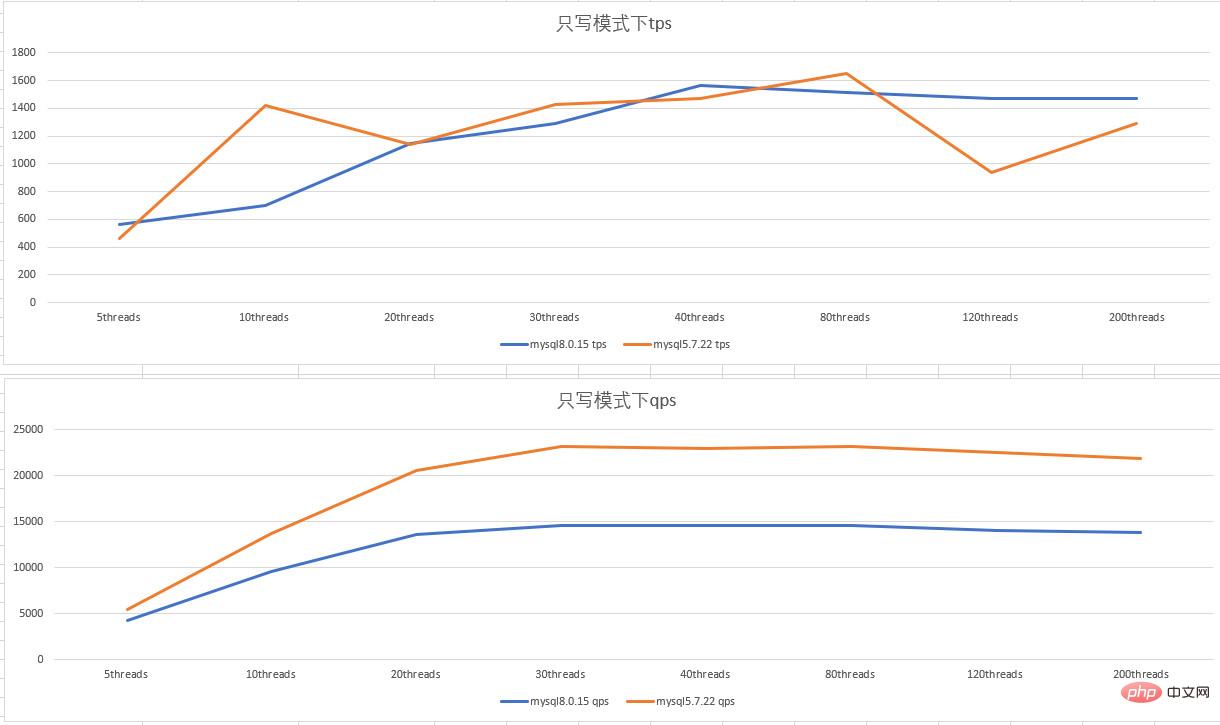
- 0 2 配置,只写模式下,mysql5.7.22的tps 抖动比较大;mysql5.7.22 的qps比mysql8.0.15好1/3左右
结论
- 整体来看,mysql5.7.22在读写模式、只读模式、只写模式下的表现是优于mysql8.0.15的
- 随着并行数的增加,性能表现不会也跟着增加,还会出现下降
- 本次测试结果是在配置很低的情况下进行的,不代表绝对
注意
sysbench 需要设置--db-ps-mode=disable 禁用预编译语句,不然并发测试线程多时会报下面的错误
FATAL: mysql_stmt_prepare() fAIled
FATAL: MySQL error: 1461 "Can't create more than max_prepared_stmt_count statements (current value: 16382)"
FATAL: mysql_stmt_prepare() failed
FATAL: MySQL error: 1461 "Can't create more than max_prepared_stmt_count statements (current value: 16382)"
FATAL: thread_init' function failed: /usr/local/share/sysbench/oltp_common.lua:288: SQL API error FATAL: mysql_stmt_prepare() failed FATAL: MySQL error: 1461 "Can't create more than max_prepared_stmt_count statements (current value: 16382)" FATAL:thread_init' function failed: /usr/local/share/sysbench/oltp_common.lua:288: SQL API error
FATAL: mysql_stmt_prepare() failed复制代码
使用脚本
cat sysbench_test_mysql5.7_8.0_tps_qps.sh
#!/bin/bash
#用于sysbench 测试在读写模式、只读模式、只写模式下 mysql5.7和mysql8.0 的tps,qps
#nohup bash $0 >/tmp/sysbench_test 2>& 1 &
#
user=admin
passwd=admin
ports="8015 57222"
host=127.0.0.1
sysbench_test_mode="oltp_read_write oltp_read_only oltp_write_only"
sysbench_test_info_path=/tmp/sysbench-test
function red_echo () {
        local what="$*"
        echo -e "$(date +%F-%T) e[1;31m ${what} e[0m"
}
function check_las_comm(){
    if [ $1 -ne 0 ];then
        red_echo $2
        exit 1
    fi
}
function  restart_mysqld(){
  service mysqld${1} restart
  sleep 2
}
function  purge_binlog(){
port=$1
mysql -u$user -p$passwd -P$port -h$host< /proc/sys/vm/drop_caches
}
function  sysbench_with_diff_thread(){
thread_num=$1
port=$2
order=$3
test_mode=$4
sysbench /usr/local/share/sysbench/${test_mode}.lua --mysql_storage_engine=innodb  --table-size=100000 --tables=20 --mysql-db=test_1 --mysql-user=$user --mysql-password=$passwd --mysql-port=$port  --mysql-host=$host --threads=$thread_num  --time=60 --report-interval=2 --db-ps-mode=disable --events=0 --db-driver=mysql $order
}
function  main(){
for test_mode in $sysbench_test_mode;do
  for port in $ports;do
    for thread_num in {5,10,20,30,40,80,120,200};do
      restart_mysqld "$port"
      check_las_comm  "$?" "restart mysqld${port} failed "
      clean_os_cache
      purge_binlog "$port"
      red_echo "sysbench $thread_num  threads cleanup mysqld${port}"
      sysbench_with_diff_thread "$thread_num" "$port" "cleanup" "$test_mode">/dev/null
      red_echo "sysbench $thread_num  threads prepare mysqld${port}"
      sysbench_with_diff_thread "$thread_num" "$port" "prepare" "$test_mode">/dev/null
      mkdir -p $sysbench_test_info_path
      red_echo "sysbench $thread_num  threads run mysqld${port} $test_mode"
      sysbench_with_diff_thread "$thread_num" "$port" "run" "$test_mode" > $sysbench_test_info_path/${test_mode}_${thread_num}_$port
      # service mysqld{port} stop
    done
  done
done
}
main
栏 目:其它数据库
本文地址:https://zz.feitang.co/shujuku/32033.html
您可能感兴趣的文章
- 12-31hiredis从安装到项目实战操作
- 12-31phpmyadmin登录时怎么指定服务器ip和端口
- 12-31MySQL线上死锁分析实战
- 12-31MySQL 触发器的使用和理解
- 12-31MySQL 字段默认值该如何设置
- 12-31Redis主从同步配置的方法步骤(图文)
- 12-31MySQL 字符串拆分操作(含分隔符的字符串截取)
- 12-31redis 交集、并集、差集的具体使用
- 12-31MySQL精讲之二:DML数据操作语句
- 12-31PostgreSQL判断字符串是否包含目标字符串的多种方法


阅读排行
推荐教程
- 12-07mysql中外链接是什么意思?
- 12-07Redis中的Scan命令的使用详解
- 12-05mysql的事务,隔离级别和锁用法实例分析
- 12-15浅析mysql迁移到clickhouse的5种方法
- 12-08添加mysql的用户名和密码是什么语句?
- 12-23PL/SQL登录Oracle数据库报错ORA-12154:TNS:无法解析指定的连接标识符
- 12-20PhpMyAdmin出现错误数据无法导出怎么办?
- 12-19Redis中实现查找某个值的范围
- 12-23详解Oracle游标的简易用法
- 12-23使用imp和exp命令对Oracle数据库进行导入导出操作详解